On September 12 I raised the price of one product, the dashboard said “Saved”, and three minutes later the old price was back. The next publication run then pushed that old price to our web store, Mercado Libre, Amazon, two department-store marketplaces, Coppel, Walmart and the product page. Every channel reported success. All of them were wrong.
Selling one catalog on seven channels means one price change is really seven to twelve writes, each with its own API, its own idea of a “sale price”, and its own way of leaving old discounts running. This post is the system we use now, the log that keeps it honest, and the three failures that shaped it. Every number below comes from our own change log.
The shape of the problem
Since July 22 our price log has recorded 1,306 channel price writes across 116 products: 823 on Amazon, 386 on Mercado Libre, 83 on our WooCommerce store, and a handful on Walmart, Coppel and the department-store marketplaces. 665 were increases and 354 were decreases. That ratio is not a pricing strategy; it is mostly us correcting prices that had drifted below where they should have been.
Notice how lopsided it is. Our own store gets one write per change. Amazon gets several, because one product can have two or three seller SKUs (merchant-fulfilled, Amazon-fulfilled, and sometimes a legacy alias), each with its own offer and its own scheduled discounts.
The model: one master table, a log, and a read-back
There is exactly one table people edit:
sku_pricing
  sku, msrp_incl_tax, target_incl_tax, min_price_incl_tax, updated_at

channel_price_change_log            -- one row per write to any channel
  sku, platform, listing_id, old_price, new_price, old_cm_pct, new_cm_pct,
  reason, source, changed_at
A sync script reads the master table, and for every channel and every listing of that product it does four things: read the live price from the channel, compare it with the target, close any discount that undercuts the target, and write the target. Then it reads the price back. The margin before and after goes in the log row, so a week later you can answer “why did this listing change?” without guessing.
Channels without a write API (we have two) are not silently skipped. The run report lists them under manual with the exact instruction: “no write API, rebuild the offers spreadsheet and upload it.”
Failure one: the deal on the second SKU
In July we raised a product’s price after a margin review. The catalog SKU on Amazon showed the new price. Orders kept arriving at a price 34% lower. The product had a second, Amazon-fulfilled seller SKU, and that SKU still had a scheduled discount running until the end of the month. The sync had only touched the catalog SKU.
Two rules came out of it. First, a price change resolves every seller SKU and listing for the product before writing anything, including opaque aliases. Second, a price change ends open discounts that undercut the new price rather than leaving them to expire. On Amazon that means closing the discount schedule now; on Mercado Libre it means ending the deal or promotion; on our own store it means clearing the sale price unless someone explicitly asked for a new sale.
Failure two: the cache said it matched
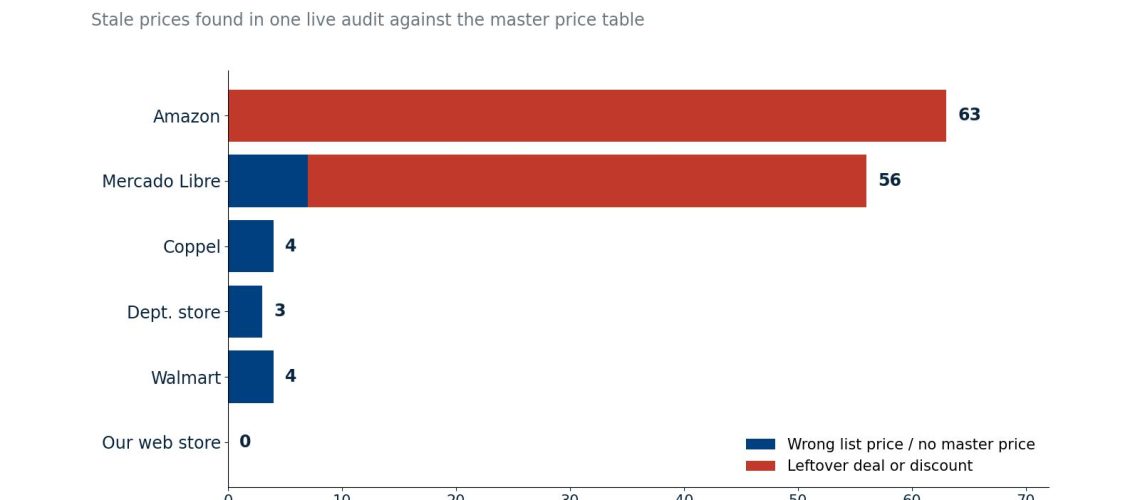
On August 18 I ran a full audit of live prices on every channel against the master table. The result:
| Channel | Stale prices found and fixed |
|---|---|
| Our web store | 0 |
| Amazon | 63 (mostly leftover discount schedules) |
| Mercado Libre | 7 list prices + 49 leftover deals |
| Walmart | 4 |
| Department-store marketplace | 3 |
| Coppel | 4 listings with no master price at all |
One Mercado Libre listing had been sitting at an old price for weeks. The reason was a single optimization: the sync skipped a listing when the price in our local cache already matched the target. It never asked Mercado Libre what the listing actually showed. Promotions that the marketplace applies on top of your list price (Mercado Libre’s deal and “smart” campaigns, Amazon’s scheduled discounts) never touch your cache. Some of the Amazon leftovers were 30% or more below the target.
The fix was to always read the live listing before deciding to skip it. It costs one API call per listing and it is the only comparison that means anything.
Failure three: two sources of truth, and a dropped save
Back to September 12. Two defects lined up. A job running every five minutes treated our web store as the price master and copied its prices into the master table. Its only protection was “skip this product if a publication run is in progress”. And the save handler dropped a price edit when a run for that product was already in progress, returning success: true with zero syncs queued. A run takes about three minutes, so an edit made during a run queued nothing, the product was unprotected, and the mirror job copied the old web price back over the edit. The log line that gave it away:
AFSR-2023-X1: 3779.0/2999.0 → 3779.0/2279.0Three changes fixed it:
- One master, stated in code. Every SKU priced in the dashboard is dashboard-mastered. When the web store differs, the job no longer pulls the web price in; it queues a run that pushes the dashboard price out. (Variable products, whose prices live on their size and color variations, are the deliberate exception.)
- Saves are never dropped. If a run is queued but has not read prices yet, it will pick the edit up. If it is already running, a fresh run is queued behind it, and a database advisory lock serializes them.
- “Saved” is never a bare word. The page now says how many syncs started, how many were already queued, and lists in red any product that is not published and therefore was not synced.
Prices hide in places that are not channels
After the channels, a price change still has to reach the places that copied the price at build time: static product pages and the pages that recommend that product, search and catalog index files, the chatbot’s product sheet, the FAQ’s “from $X” lines, email templates, and social images with the price printed on them. None of those read the price live. Our checklist for a price change has about a dozen lines, and the last one is a live check on every surface that the old price no longer appears anywhere. The social images are the easiest to forget; a scheduled post with last month’s price bar is a public mistake.
The cost of getting it wrong is concrete: when a department-store marketplace sold a product at a stale price more than 10% off, the order had to be cancelled, and someone had to write the customer an apology with the correct price.
Key takeaways
- Keep one editable price table and write it down as the master in code. Any job that syncs prices between systems must know which direction is allowed. Two masters will eventually overwrite each other silently.
- Compare against the live listing, never a cache. Marketplace promotions sit on top of your list price and never touch your local copy. Read live, then decide whether to skip.
- Resolve every listing for a product before writing, and end undercutting discounts. Secondary seller SKUs and leftover deals are where a price change fails while looking finished.
- Log every write with old and new price, margin, reason and source. 1,306 rows is what lets you audit, reverse, and explain a change weeks later.
- Never return success for work you did not queue. A save that queued zero syncs should say so in red.
If you want to copy it this week
Make a sheet with one row per product and one column per channel listing (including every secondary SKU), and fill each cell with the price a customer sees right now, read from the live page, not from your admin panel. Highlight every cell that differs from your intended price. The first time I did this the store column was clean and the marketplace columns were not. Then add a second tab where every price change you make gets one row: date, product, channel, old price, new price, why. That tab is the habit that turns into the log.
The recipe pattern is in the open Agentic Company playbook.
— Alex