I used to do competitor research the way everyone does it: open Google Maps, type a city, scroll, open ten listings, lose the tab, start over in the next city. That is not research. That is a walk.
What I wanted was a directory I could keep — every mobility shop we care about in México, their Google rating, how fast reviews are arriving, which chains are opening branches, and what customers actually complain about. Then one screen that turns that into where the market is, not a pile of CSVs.
The data source is Outscraper (that link is a referral — I earn a bonus if you sign up through it). The screen is what I call Directory Insights. This post is the plain version of how we wired it, what the first pull cost, and what it costs to keep it fresh.
The same pattern — agents crawl, you approve anything paid or public — is in the open Agentic Company playbook. First post in this series: Agentic Company — turning a wish into a scheduled job.
The wish (say this once)
Pull Google Maps places and reviews for the shops we track. Snapshot ratings and review counts on a cadence. Do not download every review text every week. Show me growth, geography, chains, and themes. Ask before spending on a new text crawl.
What Outscraper actually is
Outscraper is a pay-as-you-go Google Maps API. You send a search (a shop name + city, or a category + metro). You get back structured place data: name, address, rating, review count, Google place id.
A place lookup is cheap. A review-text lookup is where the bill lives.
Public pricing (as of this writing, on Outscraper’s pricing page):
- First 500 places and 500 reviews per month are free.
- After that, $3 per 1,000 records until you pass 100,000 in the month.
- After 100,000, $1 per 1,000.
We did not buy email or phone enrichment. For competitor tracking you need ratings, counts, and (once) review texts. Contact scraping is a different job and it stacks extra dollars.
How we use it
1. Build the list. We already had a directory of México mobility / ortopedia shops from public registries and websites. Outscraper is not the first source — it is the Google truth layer on top.
2. Places-only refresh. For each tracked shop we ask Maps: current stars and current review count. We save a snapshot. Two snapshots = you can see who is growing.
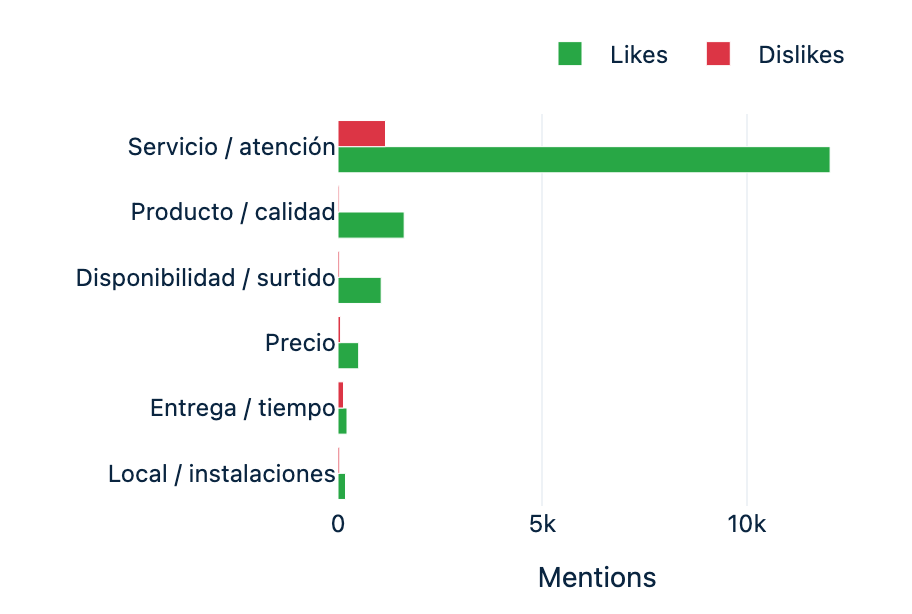
3. Review texts (once, then deltas). We pulled the actual review wording once, so we can chart themes (service, product, price, delivery). We do not re-download the whole library every Sunday. New texts only when I confirm, newest-first, stop when we hit a review we already have.
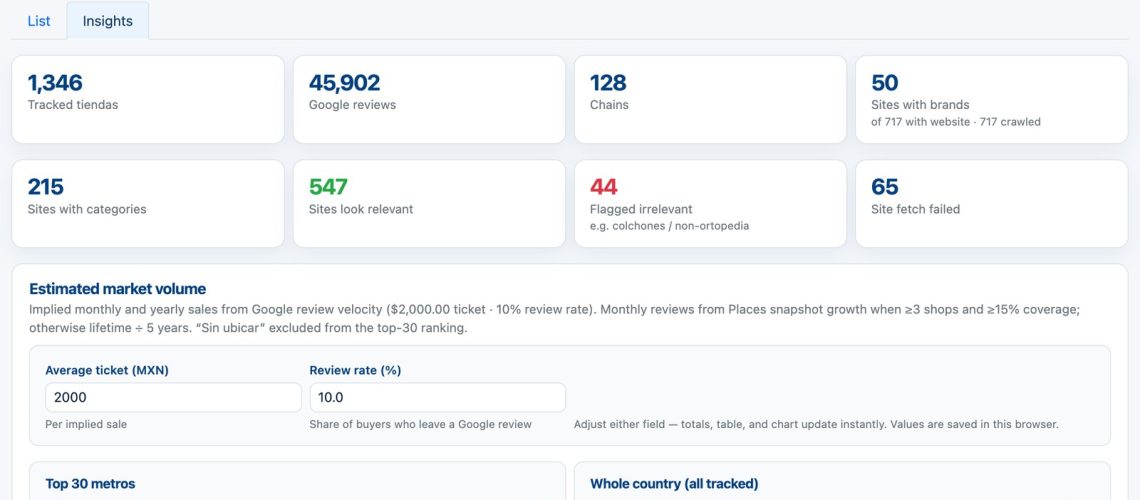
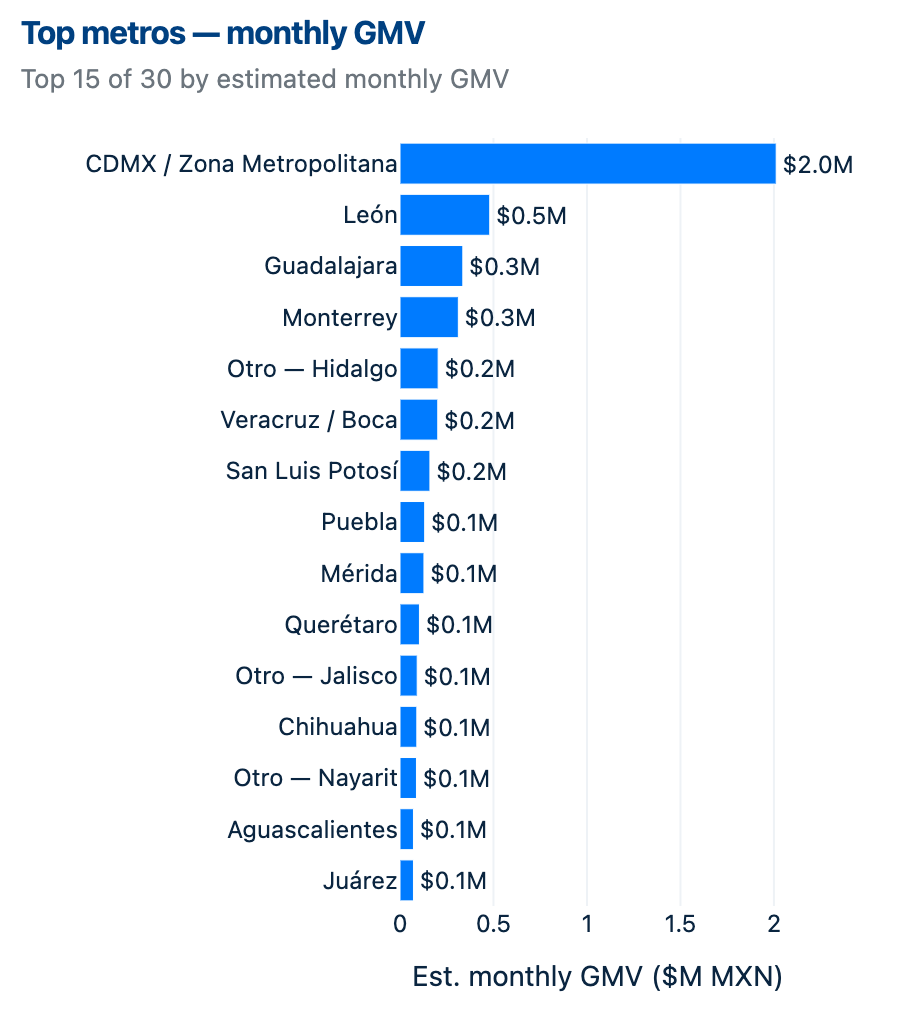
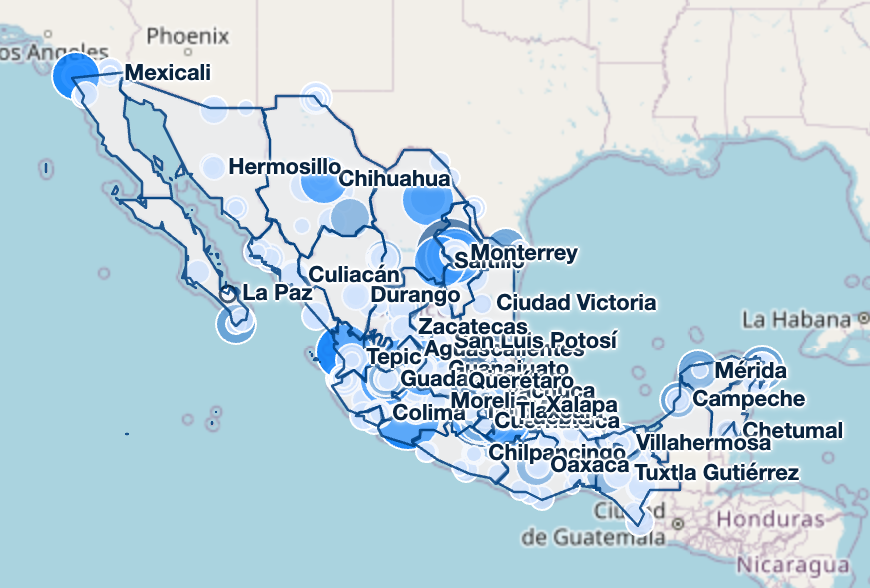
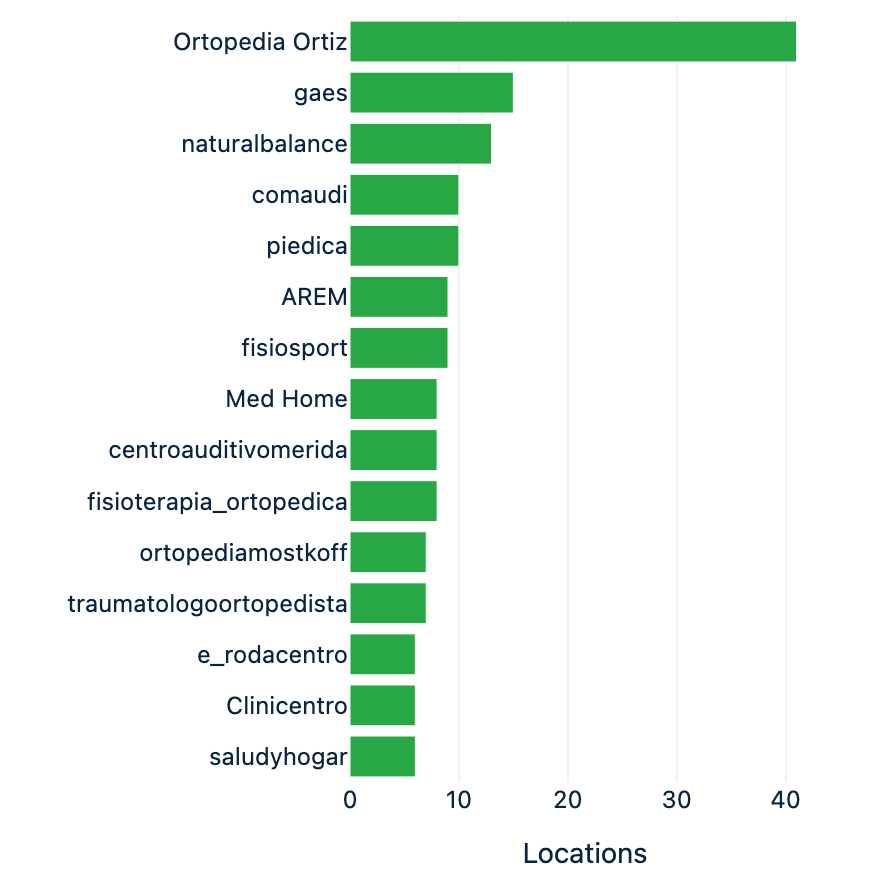
4. Directory Insights. That data lands on one operator page: counts, implied category volume, a México map, growth bars, chains, metros, and theme charts.
The expensive step is #3. Treat it like buying a library, not like running a weekly report.
Three months later: bigger list, cleaner list
The screenshots below are from the first version in July, when we tracked about 1,300 shops. By October the directory had grown to 5,157 shops (4,133 ortopedias and 1,024 medical-equipment sellers). Most of that growth did not come from Google at all.
The official registry did the heavy lifting. Mexico’s statistics office (INEGI) publishes every registered business with its activity code in a free directory called DENUE. Filtering it by the two or three activity codes that describe your category is enough. One import added about 1,000 shops in an afternoon, for $0. Google Maps then became what it should have been from the start: the layer that tells you which of those shops customers actually visit and talk about. Pharmacies share the same neighborhoods, so we count them but never import them — otherwise every chart turns into a pharmacy chart.
The bigger lesson was cleaning. A competitor list that nobody audits slowly fills up with things that are not competitors, and every ranking built on top inherits the mess. What we found and fixed:
- Search terms pull in strangers. A Maps query for “grúa para pacientes” (patient lift) returned 103 tow-truck companies — grúa also means tow truck. The keyword was dropped from the sweep.
- Same code, different business. The orthopedic registry code also covers hearing-aid shops. 105 of them were skipped on import, and chains like hearing-aid or podiatry brands no longer count as “industry players” in the chain chart.
- Not every map pin is a shop. AutoZone, OfficeMax, doctors’ offices and public hospitals show up near the real stores. They stay on the map for context but carry no sales estimate and never enter a ranking.
- Shared platforms fake matches. When we used the list to keep competitors out of a partner outreach, 3,060 doctors were wrongly flagged as shops because they listed a Facebook page or a Doctoralia profile as their “website” — the same domain as a competitor’s Facebook page. Shared platforms no longer count as a match.
- Wrong Google place, fake growth. The weekly refresh
re-resolves each shop to a Google listing. When it picks the wrong one,
a shop with 82 reviews in total suddenly “grows” 169 reviews
a month, and a whole city’s market estimate (a model of the shops,
not our own sales) jumps tenfold. Now growth only counts
when it is the same Google place week over week, a month can never add
more reviews than the shop has in total, and two rows pointing at the
same place add nothing. In SQL the guard is one window function:
SELECT place_id, captured_on, review_count - LAG(review_count) OVER w AS delta FROM place_snapshots WINDOW w AS (PARTITION BY shop_id ORDER BY captured_on) -- then keep rows WHERE place_id = LAG(place_id) OVER w -- AND delta BETWEEN 0 AND review_count - The model was too generous. We first assumed one Google review per 10 sales. Cross-checking against the official registry and population data, the real ratio is much lower than we assumed, so every volume estimate is now shown as an approximate range, never a single number.
And one operational failure worth confessing: the Outscraper balance ran out and the weekly refresh returned zero places for three weeks before anyone noticed, because “zero rows” is not an error. Now a payment-required response stops the run and pings me, and a refresh that returns nothing puts WARNING in the subject line.
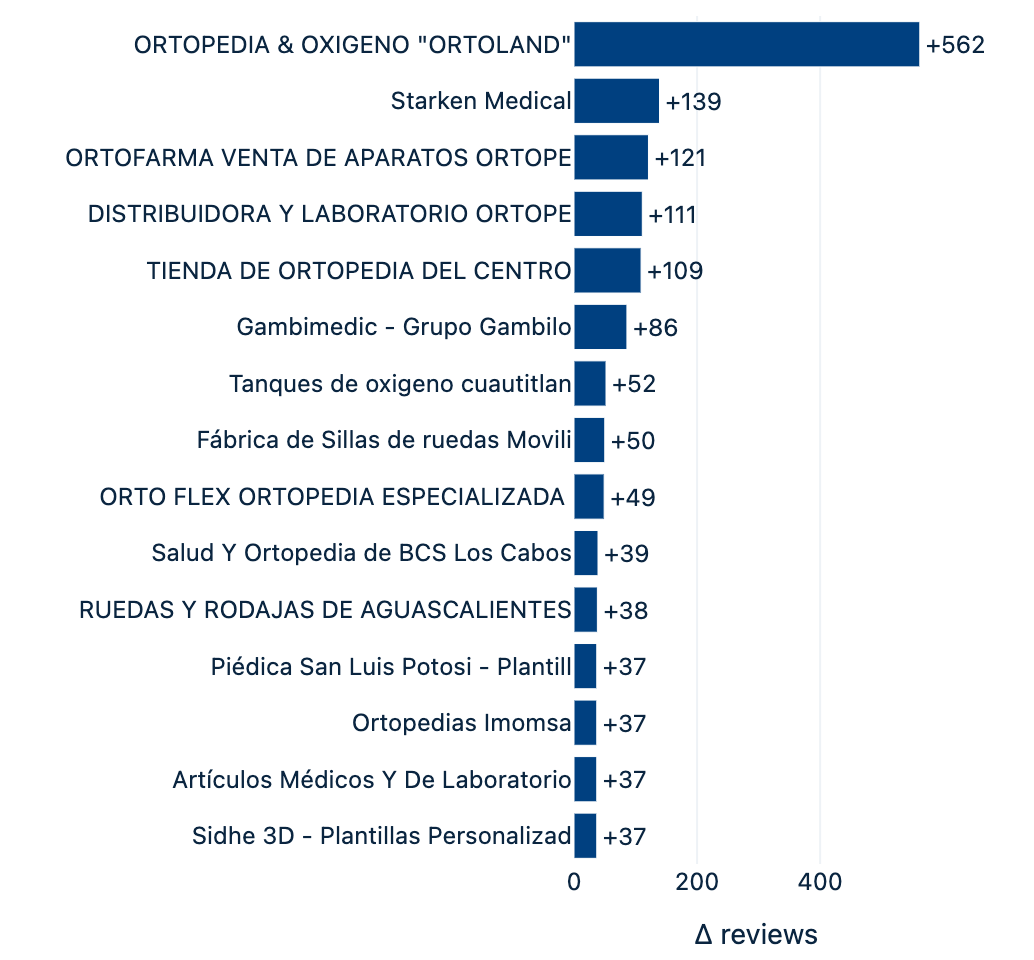
What I read every Monday now is a short market summary: the ten fastest- growing shops, the ten biggest by estimated volume (as ranges), and per city how many shops there are and how big the market looks from census data. It ends with three concrete actions — usually “call these three shops this week.” That is the point of the whole pipeline: a phone list, not a dashboard.
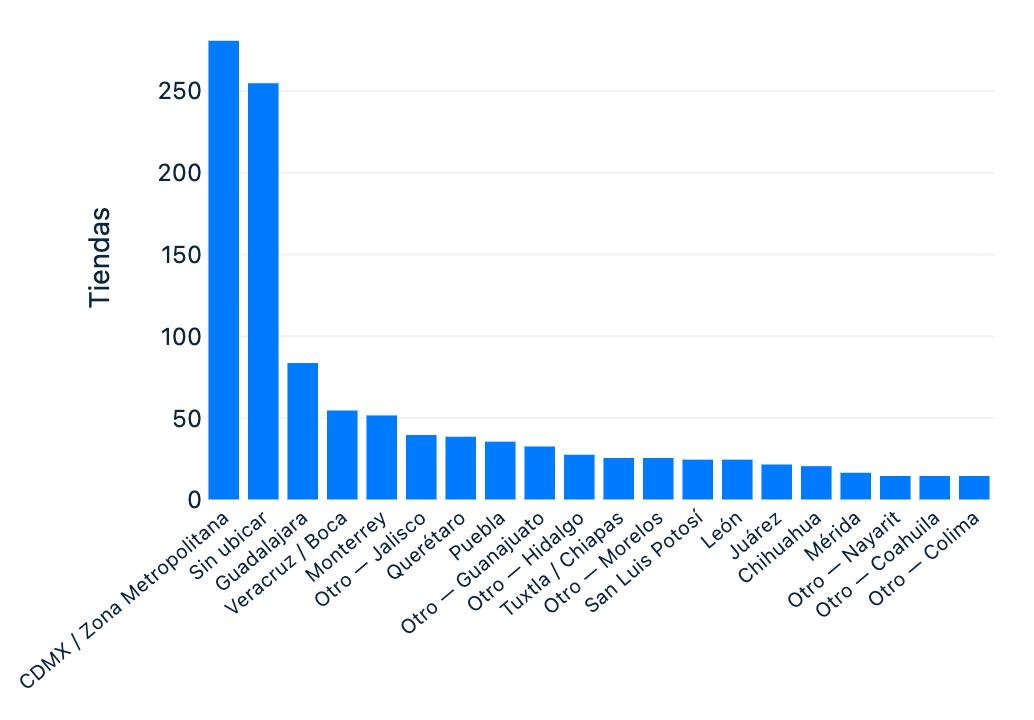
What Directory Insights looks like
These are real screenshots from the Insights screen as it looked in July (first version, before the cleanup above). The dollar figures in the volume model are implied category estimates from public Google listings (you can change ticket size and review rate on the page). They are not our company sales.


What the first pull cost
We logged this as estimated API spend (Outscraper’s $3 / 1,000 rate × records). Day one was 19 July 2026.
| What we pulled | Rough $ |
|---|---|
| Places-only snapshot for ~1,200 tracked México shops (rating + review count, no texts) | ~$2.10 |
| Full Google review texts for the tracked set (~17,700 reviews) | ~$53 |
| Small extras (chain lookups, a retry) | ~$3–$6 |
| Day-one total | about $61 |
The library of review texts is the line item. The snapshot that lets you watch growth is pocket change.
A later discovery pass (888 Maps queries across 22 metros for shops we did not already have) cost about $21; the INEGI registry import that added another ~1,000 shops cost $0. Discovery is occasional coverage work, not the weekly job.
What it costs to keep it updated
This is the part I wish someone had written down for me.
Weekly (designed job): places-only refresh — stars and review counts. In July, with ~1,300 shops, that was about $2–$3 a week. Now that roughly 3,000 shops resolve to a Google listing, it is about $9 a week — still less than one lunch. Shops that come only from the official registry cost nothing until they appear on Maps. You get growth deltas. You do not pay for texts you already stored.
Review texts after that: $0 until you approve a crawl. Then $3 per 1,000 new reviews. If fifty shops each picked up twenty new reviews, that is ~1,000 texts → about $3. If you re-download the whole ~18,000-review library every month, you will recreate the $53 bill for no reason.
Monthly freebie: Outscraper’s first 500 places and 500 reviews. Fine for a test city. Not enough for a national directory.
Do not do: enrich emails and phones “while you’re there.” That is a different product and a different invoice.
Hard gate we use: the weekly email estimates the $ to fetch new texts and waits. No silent paid crawl.
How you can copy this
- Create an Outscraper account. If this write-up saved you an afternoon, sign up through my referral link — I get a bonus; you get the same product and the same free tier.
- Start with one metro and places-only. Confirm the rows look like real shops.
- Save snapshots (date, rating, review_count, place_id). Growth needs two dates.
- Pull review texts once. Store each review id so the next run can stop early.
- Chart what you actually decide with: top growing shops, metros, a couple of themes. A 40-column export is not a strategy.
- Put a dollar cap on any job that calls the Reviews API.
Prices change — check the official pricing before you plan a crawl.
Key takeaways
- Model snapshots, not scrapes. Use one table keyed by
(place_id, captured_on)withratingandreview_count. Growth is aLAG()over that table; you never need to re-download a place to know it moved. - Make review texts incremental. Store every
review_idyou have already paid for, sort the API call by newest, and stop paginating the moment you hit a known id. That one early-exit is the difference between a few dollars a month and re-buying the whole library. - Put a dollar estimate in front of every paid call. The scheduled job computes records × unit price before it runs the Reviews API, writes it into the weekly email, and waits for an explicit yes. Places-only refreshes can run unattended; text crawls cannot.
- Separate the truth layer from the list. Keep your own
directory (public registries, websites) as the master list and treat
Maps as an enrichment join on
place_id. When a shop closes or rebrands, you fix one row instead of a spreadsheet. Start the list from the official business registry (DENUE in Mexico) — it is free and complete — and pay Google only for the signal. - Audit the list before you trust the ranking. Write the
cleanup as code, not as a one-off: an
is_core_shop()check that keeps car-parts stores, doctors and hospitals out of every estimate; a guard that ignores growth when the Google place changed or when one month would exceed the shop’s lifetime reviews; and a rule that shared platforms (Facebook, Doctoralia) never count as a matching website. Then make “zero rows returned” an alert, not a quiet success.
Why this belongs in this series
The job is boring on purpose. Maps does not care about your strategy deck. An agent can refresh places every Sunday, draft a “who grew” memo, and stop. You decide whether a $3 text crawl is worth it this week.
That is the same pattern as the first post: wish → recipe → scheduled job → human OK. The recipes live in Agentic Company on GitHub.
Closing
Competitor tracking on Google is not a mystery. It is a places API, a reviews API, and the discipline to not re-buy the library every week.
First bill: about $61 (almost all review texts). Keep-alive: about $9 a week for counts on ~3,000 Google listings, plus a few dollars when you choose to fetch new wording. The free official registry and a few cleanup rules did more for accuracy than any extra API spend.
If you want to try it, the button below is my referral link (I earn a bonus; the price is the same for you).