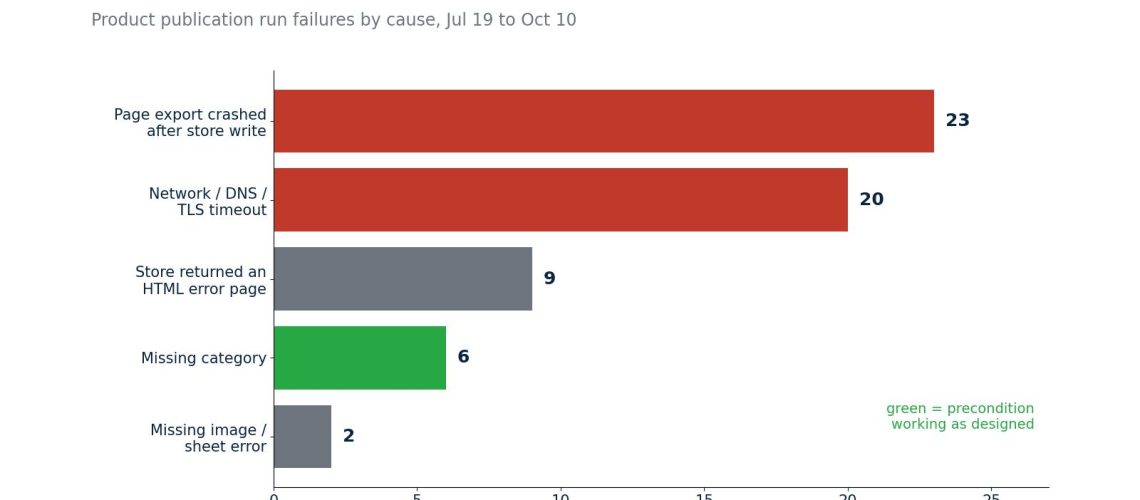
Since July 19 our system has run 237 product publications. 60 of them failed. When I grouped the failures by cause, almost none were bugs in the publishing logic. They were the network dropping, a WordPress page that answered with an HTML error instead of JSON, a product with no category, and exporters crashing after the main write had already succeeded.
That distribution changed how I think about launching products across many channels. The hard part is not knowing what to publish. It is making a twenty-step process that survives step fourteen failing at 11 p.m. This post covers the run model we use, what the failure log taught us, and six launch bugs that each became a hard rule.
What “go live” means here
For one new product, Mexico only, the same-day list is: the master record in our dashboard, the web store listing, the static product guide page and the category and catalog pages that list it, the search index files, the user manual and its one-page spec sheet, the FAQ when the product raises new questions, the five public forms that let customers pick a product (support, survey, review, recommendation quiz, extended warranty), the sitemaps, the chatbot’s product sheet, and then the marketplace listings. About twenty surfaces, most of which never talk to each other.
International storefronts and the distributor pages are deliberately not on that list. They are batched once a month. Re-exporting six country sites for every new product was the single biggest source of slow, fragile launches, and nobody abroad was waiting for a product on the day it launched in Mexico.
The run model
A launch is a row in a table, not a script someone runs:
product_publication_runs
  id, product_id, source,            -- dashboard | dashboard_price | woocommerce_price
  status,                             -- queued | running | completed | failed | superseded
  message, log_path,
  created_at, started_at, completed_at
Saving a product queues a run. A worker picks it up, takes a database lock so two runs never interleave, does the store write, then the targeted rollout of the pages that embed the product, and writes the full log to a file the dashboard links to. A run that fails stays in the table with its message and its log, so a failure is something you can find a week later rather than a line that scrolled off a terminal.
Median run time is about 2.5 minutes; the slowest 10% take close to 4. That matters for one reason: a person will edit the product again while a run is in flight, and the system must not drop that edit. (It did once; the price propagation post tells that story.)
What 60 failures taught me
| Failure cause | Runs | What it really was |
|---|---|---|
| DNS / connection reset / TLS timeout | 20 | The worker runs on a laptop. Wi-Fi drops; the laptop sleeps mid-run. |
| Page export subprocess crashed | 23 | The store write succeeded; a later page export failed. |
| Store API answered with an HTML error page | 9 | A WordPress fatal error, returned as a 500 with a Spanish error page instead of JSON. |
| Missing category | 6 | A precondition doing its job. |
| Spreadsheet API error, no public image | 2 | Same. |
August was the bad month: 32 of 53 runs failed, mostly network and exporter failures. July, with fewer moving parts, had 4 failures in 67 runs. October so far: 5 in 56.
The table says three things. First, a single “failed” status is too blunt: in 23 of the 60 cases the product was already live and only a page export failed, which is a very different problem from “not live”. Recording the store write and the page rollout as separate outcomes is the next change. Second, a third of the failures were the network, and those deserve an automatic retry with backoff; today a person presses retry. Third, the preconditions are the only failures that worked exactly as designed. They run before the first write and say what to do: “WooCommerce category slug is required. Open Edit product, set it, then retry.” Those should never be retried automatically.
The quiet rule that prevents most damage
When a product already exists in the store, the dashboard’s version is not automatically better. Someone may have written a richer description in the store, or uploaded better photos. So the update path never sends an empty field:
if existing:
    # Do not erase richer store content if the dashboard has no replacement.
    if not payload.get("images"):
        payload.pop("images", None)
    if not description:
        payload.pop("description", None)
    payload.pop("short_description", None)
    return store.put(f"products/{existing['id']}", payload)
if not payload.get("images"):
    raise ValueError("At least one image with a public URL is required before publishing.")
Creating requires an image. Updating never deletes one. That asymmetry has saved more listings than any validation I have written.
Six launch bugs, six hard rules
Each of these happened once on a real launch and is now a rule that fails the launch rather than warning:
- Packaging as the main image. A marketplace moderator rejected a listing because image one showed the retail box, not the product on pure white. Another marketplace had a lifestyle photo first. Now image one must be a transparent cutout (or its white-background flatten for channels that require white), proven by filename and by checking the alpha channel. If it cannot be proven, the channel is skipped and the launch report says why.
- Gallery order differed by channel. One product got a hand-curated order; the next got whatever the folder listing returned. Now one helper orders every gallery the same way before any upload, then applies each channel’s image cap.
- Carton sizes written everywhere except where people look. Package dimensions went to the store and two marketplaces, but the dashboard’s product page still showed blanks because it reads a separate shipping-sizes table. Now that table is written first, and the channels are filled from it.
- “Model” filled with the product name. Marketplaces have a model field that buyers and support use to identify the exact product. It now always holds the catalog SKU without hyphens, generated by one function.
- A one-year warranty nobody offered. One channel’s listings showed a one-year warranty because that was the publisher’s default; the policy is three months. Warranty is now encoded per channel by one helper, including the channel whose API only accepts 30 days or one year (it gets 30 days).
- The spec sheet erased twice. We built and published 74 one-page spec sheets in a day. The buttons linking to them disappeared from the manuals page twice, because two later deploys rebuilt that page from a code branch that did not contain the change. Now production pages are built only from the main branch, and a deploy guard refuses to ship anything older than what is live.
Key takeaways
- Make each launch a durable run row with a status, a message and a log file. Queued, running, completed, failed. Failures stay findable instead of disappearing into a terminal.
- Separate the core write from the rollout, and say which step failed. “Live but one page stale” and “not live” need different responses.
- Retry transient errors and never retry preconditions. Classify network, timeout and HTML-instead-of-JSON responses as retryable; missing category or image as a message to a person.
- Creating requires content; updating never deletes it. Drop empty fields from update payloads so a thin master record cannot wipe richer channel content.
- Turn every launch bug into a hard-fail rule in shared code. One helper each for image one, gallery order, model number and warranty, called by every channel publisher.
If you want to copy it this week
Write your launch checklist as a sheet with one row per product and one column per surface, and fill each cell with a link to the live result, not a tick. A tick says someone thought they did it; a link proves it. Add a column for “main image is the product on white, not the box”. When a launch goes wrong, add a column for the thing that went wrong. After ten launches you will have your rules, and the columns that are always filled in last are the ones to automate first.
The recipe pattern is in the open Agentic Company playbook.
— Alex